

Solutions that Handle Multiple Vendors Per Item as well as Commodity and Purchase
Item & shopping lists, purchase orders, requisitions, supply orders, transfers, receiving and invoice reconciliation
The ordering, menu based ordering and par ordering components provide the full range of options from manual order entry to fully automated order processing, with every link in the supply chain predefined to guarantee best practices district‐wide.
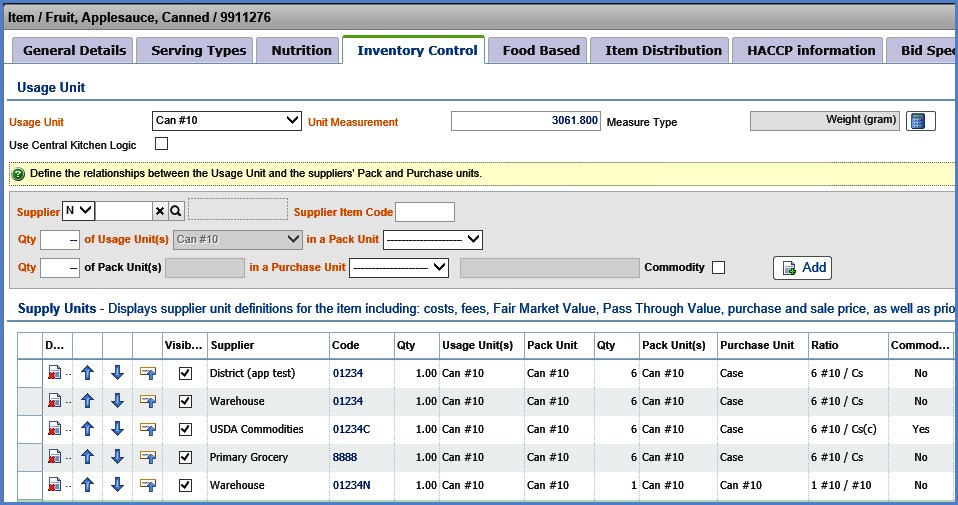
Define purchase units, suppliers and supply chain hierarchy
Supports an internal “Usage Unit” for each item plus Purchase and Pack Units for each supplier
- Warehouse or Central Kitchen and other inter‐site transfer locations
- Order and transfer by any of the defined units for an item—Usage/Pack/Purchase
- Tracks prices for each supplier and vendor, multiple suppliers and vendors per item
- Tracks Fair Market Value for commodities, plus delivery, processing, brokerage, storage,
- Uses suppliers/Vendor’s own code for ordering
- Displays ratio of Usage Units to Purchase Units for accurate ordering
- Supply chain priority easily edited with up and down arrows
- Sweeping vendor, price and priority changes can be applied to sites and groups of sites
Inventory Control Tab for each item allows easy management of supply chain
Flexible Supply Chain Management
Easily set an order hierarchy for each inventory item:
Purchase Order:
- A Purchase Order is any order that goes directly to an outside supplier/vendor, formal or informal
- Print, e‐mail or send via any electronic format ‐ supplier interfaces available to many major suppliers
Supply Order/Transfer
- A Supply Order is any order that goes to the warehouse or any other internal site (all sites potentially have the ability to receive requisitions and transfer stock)
- Supply Orders may be rejected by the supply site, with a text message including reason or rejection
- Print pick lists directly from supply orders or groups of supply orders by deliver date or route
- Auto convert Supply Orders into Transfers and update Transfers based on actual picks and substitutions for printing of transfer documents
- Automatically commit stock based on orders and deplete based on
Requisition/Approval
A Requisition routes orders through an approval process by District or Central Purchasing
Upon approval items in the approved requisition are automatically split into purchase orders or supply orders, based on their supply chain hierarchy settings
District supervisors, as well as site managers, can create simple lists or shopping lists with quantities already entered that can be used over and over, or use Menu Based and Par Order Components to create orders based on pre‐set PARs or forecast menu needs. Users can edit and round up or down suggested quantities to the nearest purchase or usage unit. Requisitions automatically flow to the district for approval, Purchase Orders can be printed or e‐mailed direct to vendors, and Supply Orders flow automatically to the warehouse.
TrakNOW supports settings and flags to automate the complex and tedious tasks involved in ordering, receiving, transferring and tracking stock
- Commodity Flag—sets tracking of FMV and other commodity related fees
- Commodities can be “blended” with purchased in the same item or set up as separate items
- Inventory control flag sets purchasing and receiving as a part of perpetual inventory
- Ordered by production flag sets items to be automatically ordered based on forecast menu requirements or only by par level
All costs are tracked simultaneously

 Contact